Remote control for Claude Code and Codex, from your phone
Approve permissions, reply to your AI and follow your sessions and limits from wherever you are, in Copilot CLI, Gemini CLI, OpenCode and Cursor too. Miblo tells you when the AI needs you and brings the exact request to your phone, end-to-end encrypted.
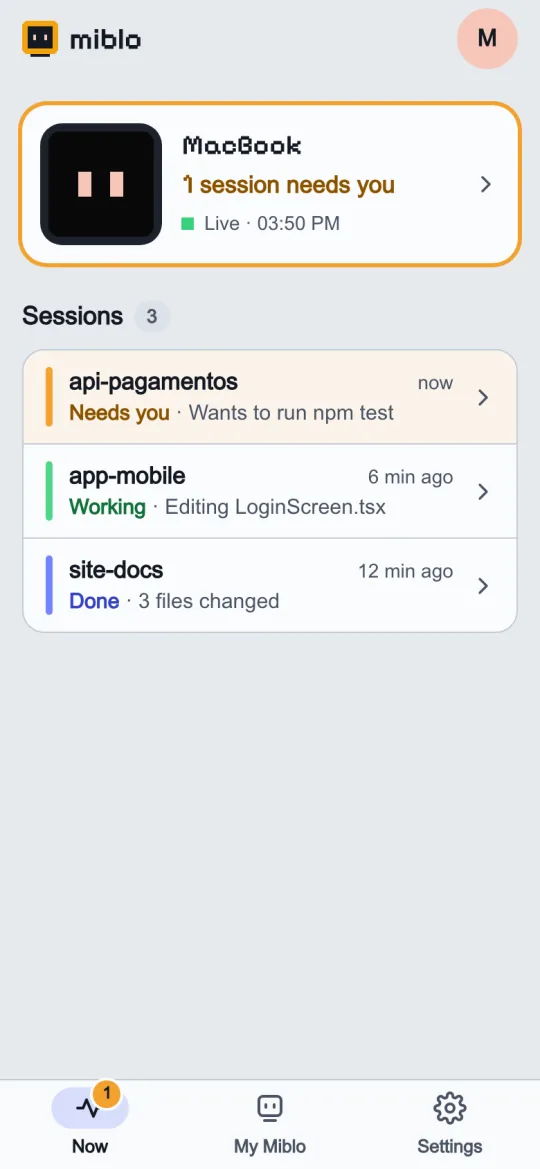
Your sessions live, with a heads-up when one needs you.
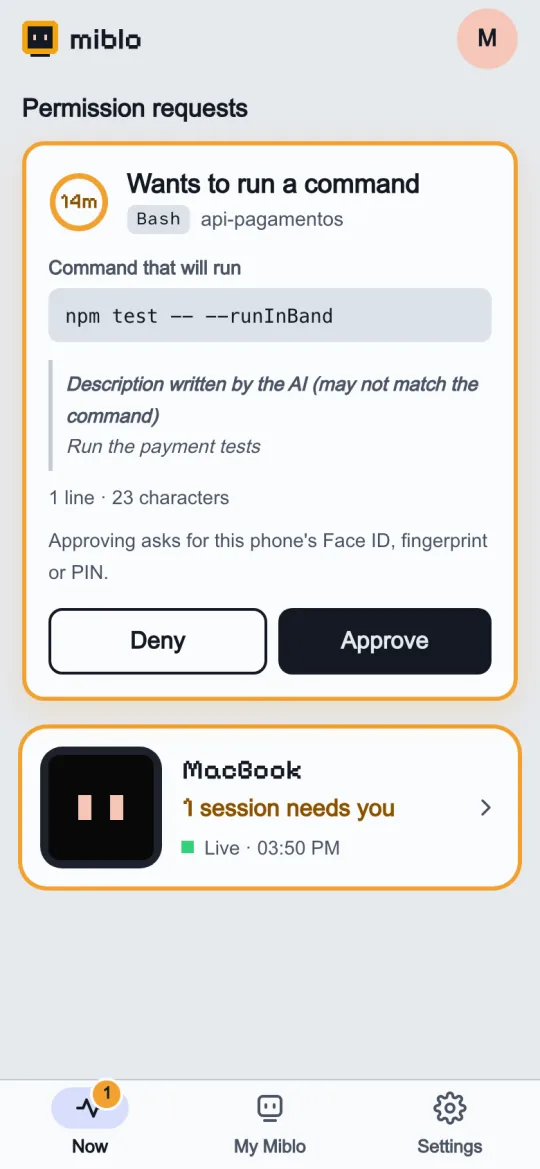
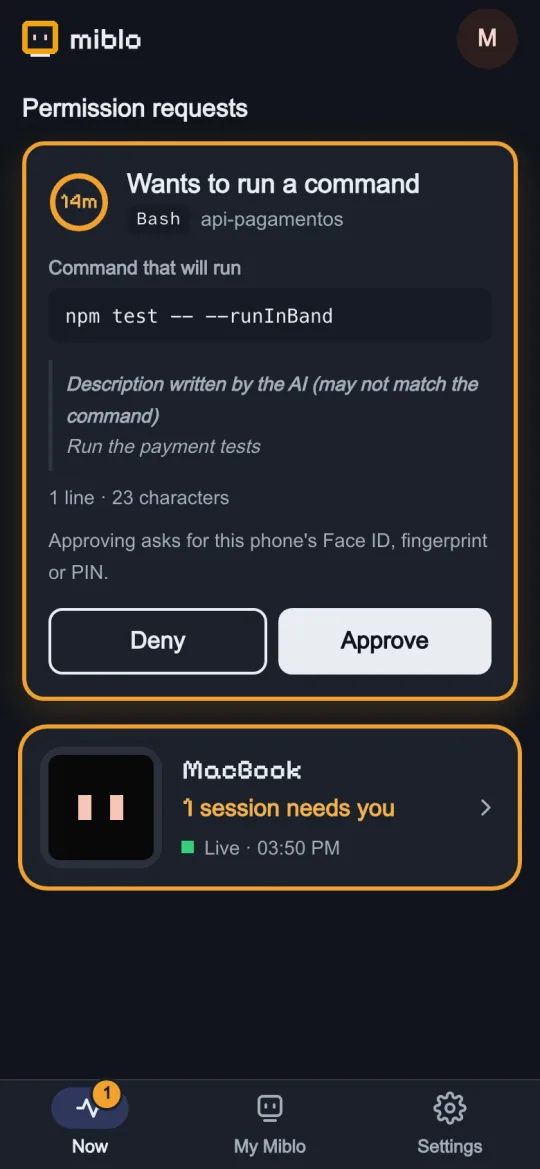
Approve or deny the exact command, with Face ID, fingerprint or PIN.
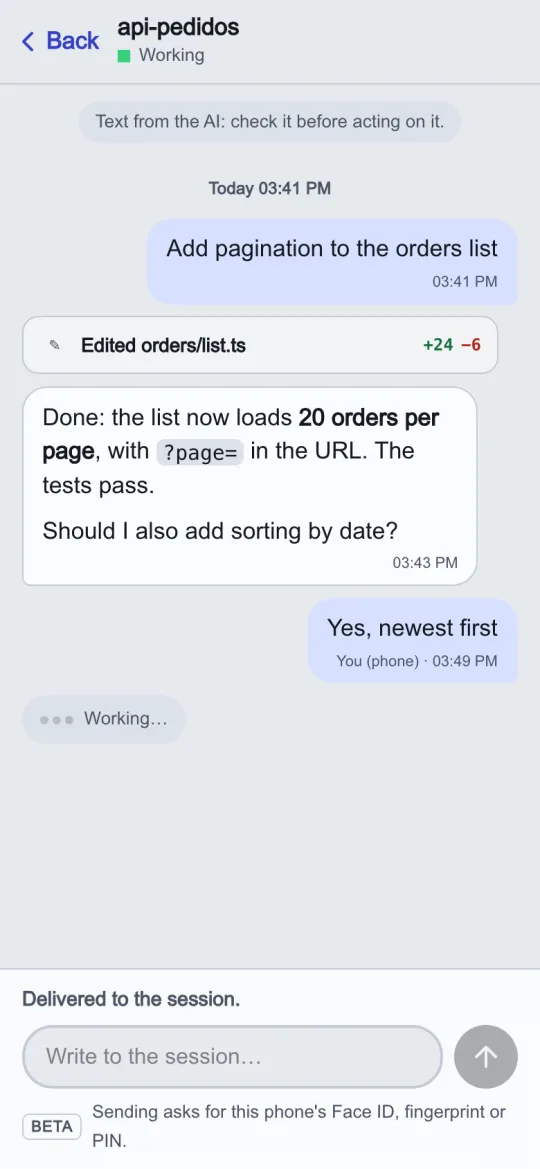
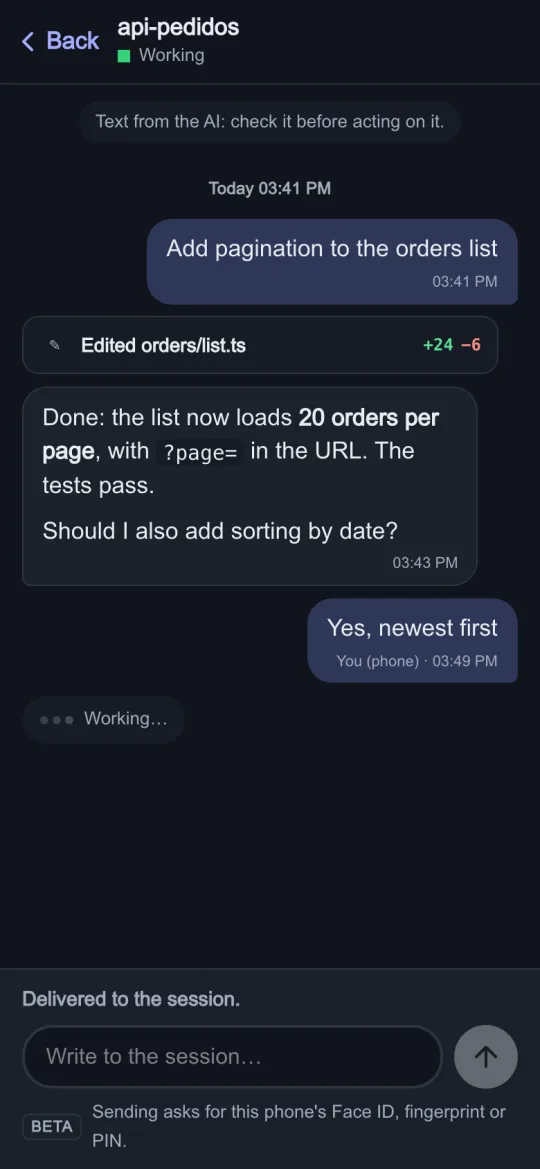
Read the conversation and reply. Your reply reaches the session.
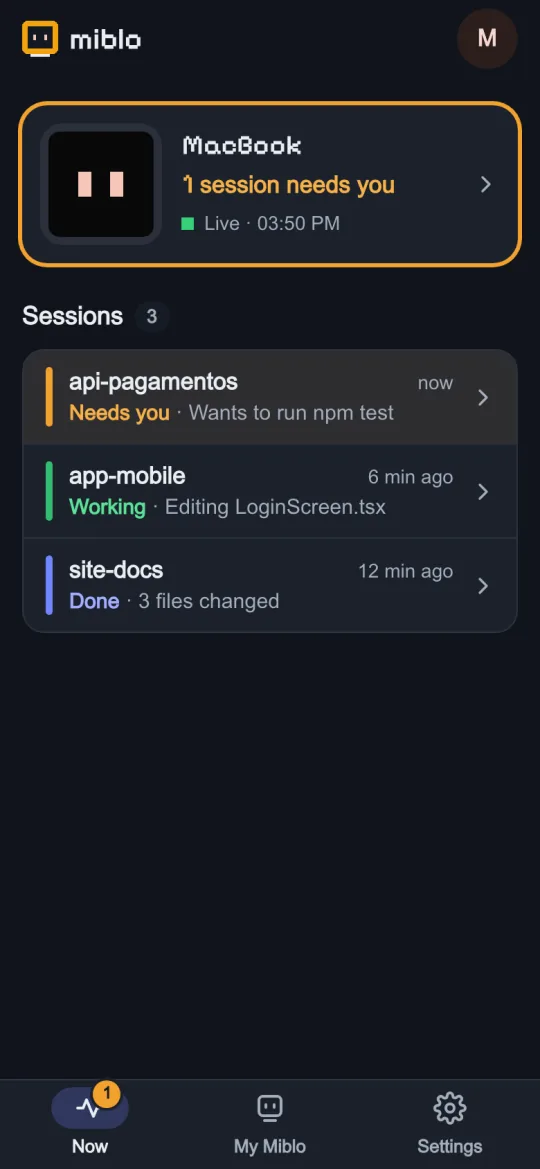
What you can do from your phone
Seeing your sessions and limits and getting the alert is free. Approving, replying, the conversation history and tasks come with Miblo+.
- Miblo+
Approve Claude Code permissions from your phone
The request arrives with the exact command. Approving asks for Face ID, fingerprint or PIN. Codex and OpenCode too.
- Miblo+
Reply to your AI from your phone
Read the conversation and reply. While a session works, your reply goes in when it finishes its turn; when it's idle, it wakes up and answers.
- Free
Check your Claude limits from your phone
Claude Code's (and Codex's) 5-hour and weekly limits on your phone, with the rest of the status.
- Free
A notification when the AI needs you
Your phone tells you when a session needs you, even away from your desk. The notification says only that, never which session or what.
- Miblo+
Conversation history
The last 50 messages of each session, straight from your computer when you open the conversation. Nothing is kept on the server.
- Miblo+
Tasks from your phone
Ask your computer's AI for a new task and follow it as a conversation, with a Stop button. Off by default.
How it works, in 3 steps
Install it on your computer
Download the Miblo app (Mac, Windows or Linux) and sign in to it with your Miblo account.
Sign in on your phone
Open miblo.ai/app on your phone and sign in to the same account. You can add it to your home screen, like an app.
Type the code your computer shows
The app on your computer shows a 6-digit code for the new phone. Type it on the phone and you're done. Approvals and replies start off: turn them on at the computer when you want them.
Approvals and replies in each AI tool
Live status is free with all of them. Approvals and replies come with Miblo+.
Claude Code · Codex · OpenCode
- Live status
- Yes
- Approvals
- Yes
- Replies
- Yes, working or idle: an idle session wakes up and answers
GitHub Copilot CLI · Gemini CLI · Cursor
- Live status
- Yes
- Approvals
- No: the tool's own flow applies
- Replies
- Yes, when the session finishes its turn
- A reply sent while the session works goes in when it finishes its turn.
- Approvals exist only where the tool itself asks: Miblo relays its request and never asks for anything it wouldn't.
- Idle Copilot CLI, Gemini CLI and Cursor sessions running inside tmux or GNU screen get replies right away too: Miblo types the reply into the session's terminal after checking it's the right one.
- For safety, replies only go into sessions that still ask before acting. For sessions in an automatic mode, and for OpenCode, Copilot CLI, Gemini CLI and Cursor (which don't report their mode), turn replies on for those cases at the computer (miblo plus replies permissive on).
See each tool:
Free or Miblo+
With a Miblo account: your live sessions, limits and the “needs you” alert on your phone.
Miblo+, from R$9.90 a month (or R$99.00 a year): approve, reply, the conversation history and tasks, on up to 5 phones and 5 computers.
See the Miblo+ plansYou don't need the gadget: the app on your computer and your phone are enough. With a Miblo on your desk, the same information also shows on the screen next to your keyboard.
Security, in plain words
End-to-end encrypted
Messages leave your computer already encrypted (AES-256-GCM) and only your phones hold the key. The Miblo server only passes encrypted data along.
Nothing crosses the server in clear
It keeps no conversations or history: only the last status frame, encrypted, for 10 minutes, with no IP address. The last 50 messages come straight from your computer.
A passkey for every action
Every approval and every reply asks for your phone's Face ID, Touch ID, fingerprint or PIN over that exact text, and the computer checks it before accepting. Denying needs no passkey.
Only what the tool asks
Miblo relays the AI's own request and never asks for anything it wouldn't. If your phone doesn't answer, the tool asks on the computer as usual. Nothing is ever approved by itself.
You turn it on, on your phone
Approvals and replies start off. Turning them on takes the computer's 6-digit code typed on one of your phones, with its passkey. An AI agent on your computer cannot turn them on.
Everything shows on the computer
Every reply and every approval shows on your computer, in a notification naming the phone, and is kept in the audit log (miblo plus audit).
The phone server is open source: you can run your own, and then your phone and computer talk only through it. The details in the docs
Frequently asked questions
Can I approve Claude Code permissions from my phone?
Yes, with Miblo+. When Claude Code asks for permission, the request reaches your phone with the exact command; you approve it with Face ID, Touch ID, fingerprint or PIN, or deny it. It works for Codex and OpenCode too. Approvals start off: turn them on in the Miblo app on your computer and confirm on your phone.
How do I control Claude Code remotely from my phone?
Install the Miblo app on your computer and sign in with your Miblo account. On your phone, open miblo.ai/app, sign in to the same account and type the 6-digit code your computer shows. Your phone then shows your sessions and limits and tells you when a session needs you. With Miblo+, you also approve permissions, reply to the AI and start new tasks.
Can I reply to my AI coding agent from my phone?
Yes, with Miblo+, in every AI tool Miblo shows: Claude Code, Codex, GitHub Copilot CLI, Gemini CLI, OpenCode and Cursor. While a session works, your reply goes in when it finishes its turn; when it's idle, it wakes up and answers (Claude Code, Codex and OpenCode). Every reply asks for your phone's passkey.
Does Miblo notify my phone when the AI needs me?
Yes, for free: your phone gets a notification when a session needs you, even away from your desk. The notification only says that a session needs you, never which one or what. Cursor has no such alert, because it does not report when it waits for approval.
Can I see my Claude limits on my phone?
Yes, for free. Your phone shows Claude Code's 5-hour and weekly limits (Pro and Max plans, read from its status line) and Codex's (when you sign in with a ChatGPT plan). Copilot CLI, Gemini CLI, OpenCode and Cursor do not report limits.
Does it work with Codex, Copilot CLI, Gemini CLI, OpenCode and Cursor?
Yes. Live status is free with all of them. Replies from your phone work with all of them on Miblo+. Approvals work with Claude Code, Codex and OpenCode, where the tool itself asks; Copilot CLI, Gemini CLI and Cursor keep their own flow.
Does it work on iPhone? Do I need to install an app?
The phone app is a page at miblo.ai/app that you add to your home screen (on iPhone: Share, Add to Home Screen) and that can send notifications. To approve and reply, the phone needs a passkey (Face ID, Touch ID, fingerprint or PIN); without one it shows the status but cannot approve or reply.
Is it safe to approve commands from my phone?
Every approval asks for your phone's passkey over that exact request, and the computer checks it before accepting. The card shows the whole command, with invisible characters made visible; a request with hidden characters can only be denied. Approvals only show when the AI itself asks, and each one is kept in your computer's log.
Does the Miblo server see my code or my conversations?
No. Everything leaves your computer end-to-end encrypted and only your phones hold the key. The server only passes encrypted data along and keeps no conversations or history.
What happens if I don't answer in time?
The request waits for your phone as long as you chose on the computer, from 15 seconds to 1 hour. With no answer, the tool asks on the computer as usual. Nothing is ever approved by itself.
Does it work away from home, on mobile data?
Yes, on any network: 4G, 5G or the café or office Wi-Fi. Your computer needs to be on with Miblo running.
Can an AI agent turn approvals on by itself?
No. Turning approvals or replies on takes the computer's 6-digit code typed on one of your phones, with its passkey, and Miblo refuses those commands when an AI agent runs them.
How much does it cost? Do I need the Miblo gadget?
Seeing your sessions and limits and getting the alert on your phone is free, with a Miblo account. Miblo+ (approve, reply, history and tasks) costs R$9.90 a month or R$99.00 a year. The gadget is optional: the app on your computer and your phone are enough.