10% off with the coupon on orders from R$149.90 · until November 25
Buy with the coupon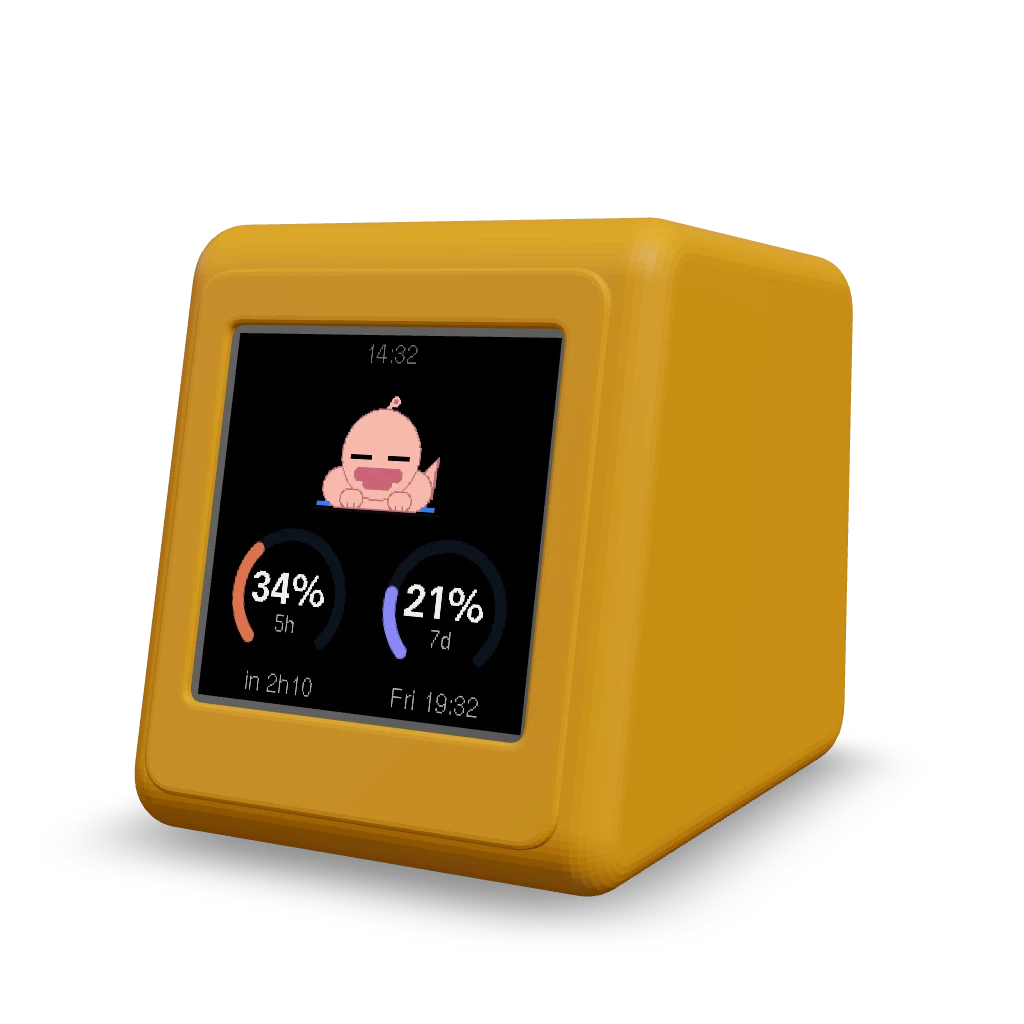
Images are for illustrative purposes only.
Your AI works. Miblo tells you. You approve.
A desk gadget for people who work with AI: for Claude Code, Codex, Gemini and your other AI agents, it shows your running sessions, tells you when one needs you and keeps your usage limits in sight. Away from your desk? The AI keeps going, and with Miblo+ you approve from your phone.
R$249.90R$189.90or 1x R$189.90 interest-freeor R$170.91 with the coupon BEMVINDO10
Sessions in sight
Up to 20 sessions at once, from Claude Code, Codex and other AI tools, each one saying what it is doing right now.
When it needs you, you know
A permission request flashes amber and stays on screen until you answer, on the computer or from your phone.
Finished means finished
The blue alert only comes when the response is really over. Long tasks get confetti.
Your limits, without opening anything
5-hour and weekly, when each resets and when your pace would run it out.
And when you stop, it plays
20 pets wander the screen with the time and your limits on a little sign.
The real Miblo, from every angle.
Actual photos of the black, yellow and white units. Take a closer look at the screen, curves, sides and back.
From the box to your desk in three steps
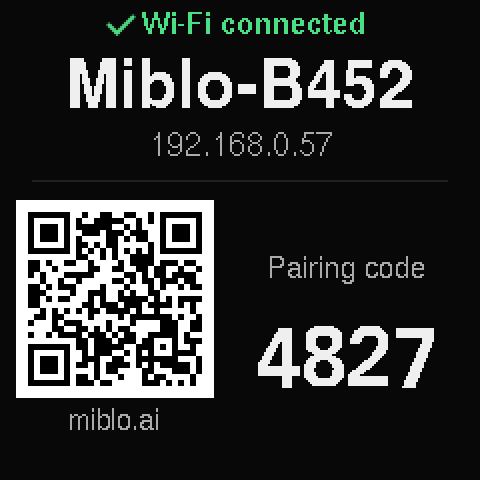
Connect it to Wi-Fi
Plug Miblo in, scan the QR code on its screen with your phone and pick your 2.4 GHz network.
Install Miblo Hub on your computer
One download for Mac, Windows or Linux. Miblo Hub finds your AI tools and sets everything up by itself, no terminal needed.
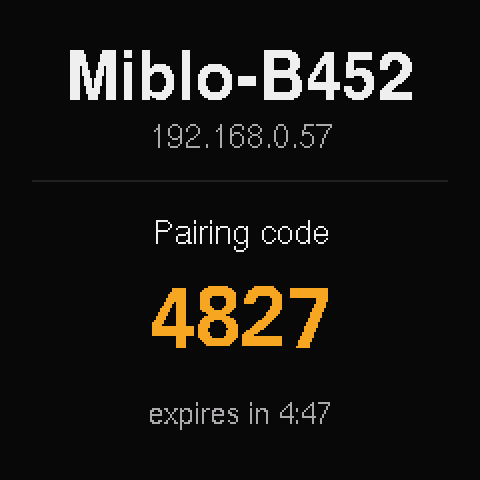
Pick your Miblo and type the code
Miblo Hub lists the Miblos on your network, like a Wi-Fi list. Pick yours and type the 4 digits on its screen. From then on, your sessions appear.


Already have a Miblo?Install Miblo Hub
9
AI coding agents
3
systems: macOS, Windows, Linux
20
pets, plus yours
0
cloud for the screen
Three ways to use it, one rule: you decide
~$ claude ▸ needs youAt your desk
Miblo Desk shows your sessions and limits and flags the one that needs you, in a colour you catch out of the corner of your eye.
~$ codex ▸ approve?Away from your desk
Miblo Remote shows the same on your phone. With Miblo+, you approve and reply from wherever you are.
~$ miblo ▸ focus 25:00Focus
A 25 and 5 minute Pomodoro, meeting mode that hides project names, and the pet when you stop. Alerts still come first.
Nothing is approved without you
Miblo never approves anything on its own: each permission request waits for your answer, on your computer or your phone. Automatic approval exists only if you turn it on for a task, and every approval goes into the audit log on your computer.
Your AI works the same without Miblo. Miblo watches and tells you; if it stops, your AI goes on as if it weren't there.
Miblo, system notifications or watching the terminal
| Miblo | System notifications | Watching the terminal | |
|---|---|---|---|
| Seen out of the corner of your eye, without switching windows | Yes, on your desk | For a few seconds | Only with the window open |
| Approve from your phone | Yes, with Miblo+ (Claude Code, Codex, OpenCode, Qwen Code, and every AI in sessions started from your phone) | No | No |
| Every AI agent in one list | 9 AI agents | Each tool its own way | One window per session |
| Usage limits in sight | Claude Code and Codex | No | Only when you check |
| Subscription required | No (Miblo+ is optional) | No | No |
And the rest of the work day
All one click away in Miblo Hub on your computer.
Focus
A 25 and 5 minute Pomodoro, with the time left big enough to read from across the room.
Meeting mode
No project or command names on the screen while you share your desk.
Notes
“Back in 10 min” for whoever walks by your desk.
Reminders
In N minutes, at a time or every weekday.
Timer
A big countdown with an hourglass, from 1 to 180 minutes.
Countdown
“Release in 3 days”, with confetti on the day.
When you stop, it plays
Miblo Desk is also an AI desk companion: a virtual pet lives on its screen. After a few idle minutes, the pet wanders around the screen holding a little sign with the time, your limits and the last task that finished. It has 30 antics and never does the same one twice in a row.
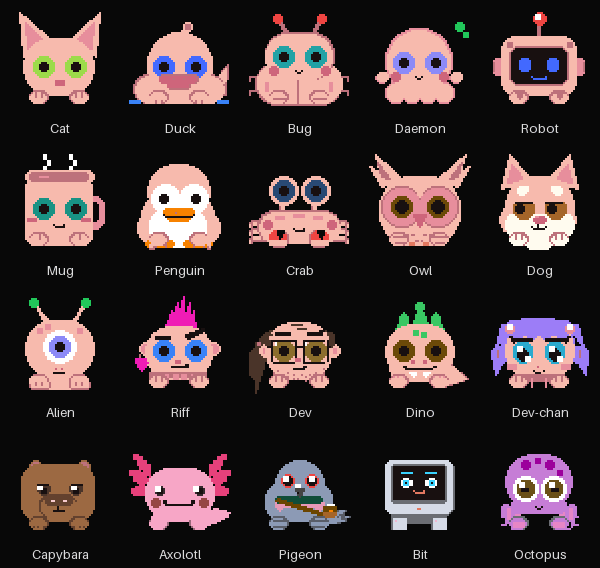
New pets
Each one with a pet-mode habit of its own and its own colours on the first preset. Here, each one on Miblo's real screen.
Capybara
Ultra-chill: it opens one eye only when a session needs you, and takes a hot-spring bath with an orange on its head.
Axolotl
Pink, with feathery gills and a permanent smile. Now and then it falls apart and regenerates.
Carrier pigeon
With its courier bag, it flies off and comes back with a letter for you.
Bit
Miblo's logo with feelings: two little dashes that blink, look around, smile ^ ^, get startled > < and doze off – –.
Octopus
Eight arms to type on a keyboard for each of your sessions, all at once.
Colour by part
Body, outline, details, nose, eyes and accent, each in any colour you like. Eyes can be round, big or sleepy.
20 accessories
Cap, crown, chef's hat, sunglasses, a headset, a bow tie, the “shipped to prod” medal and more.
Special days
A Santa hat at Christmas, a witch hat at Halloween and a party hat on your birthday.
Visits
Miblos on the same network visit each other: a pet walks off one screen and onto the next for a Friday deploy or a coffee.
Miblo+
The AI prepares. You approve.
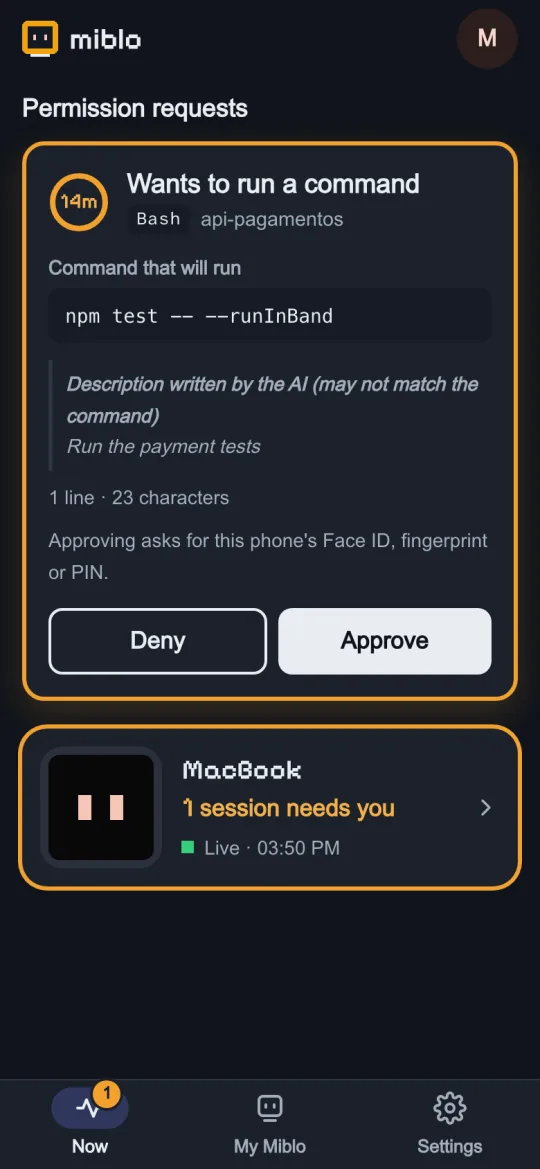
Leave your desk without stopping the work: when the AI needs you, the request reaches your phone with the exact command. Approve, reply and follow along from wherever you are.
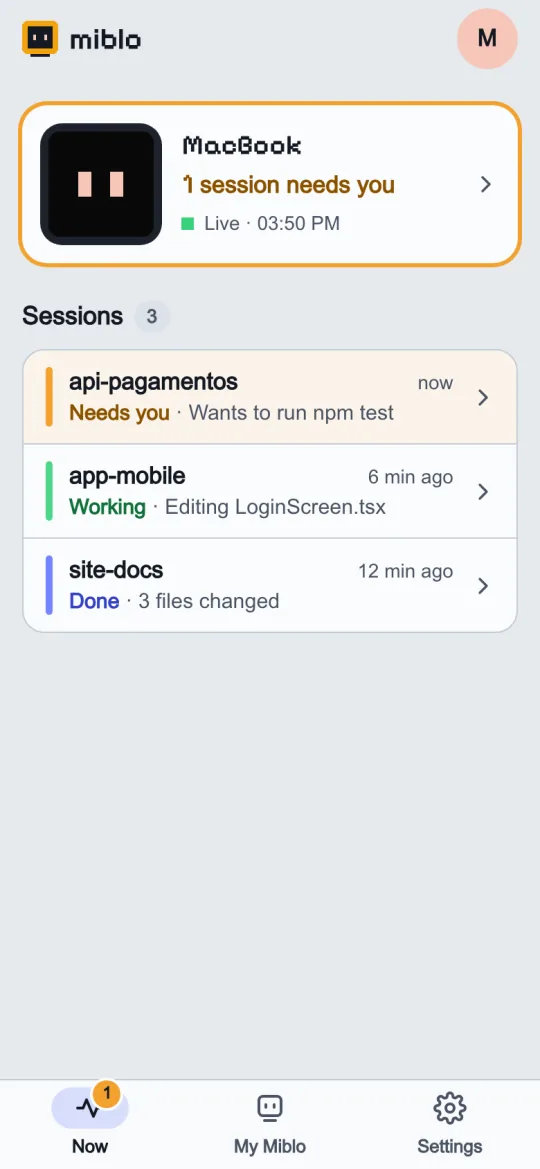
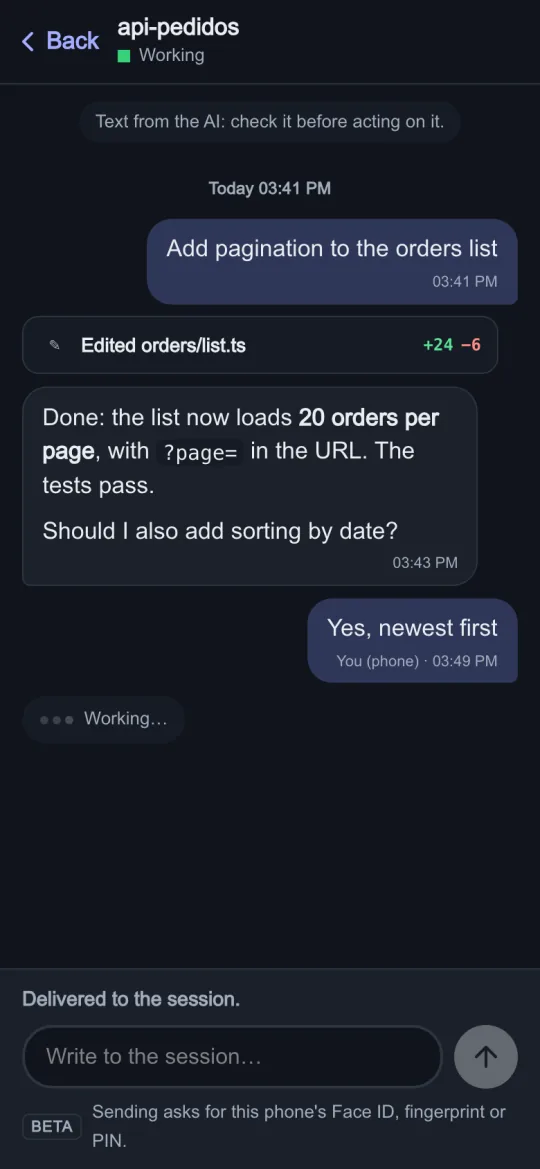
Your sessions live, with a heads-up when one needs you.
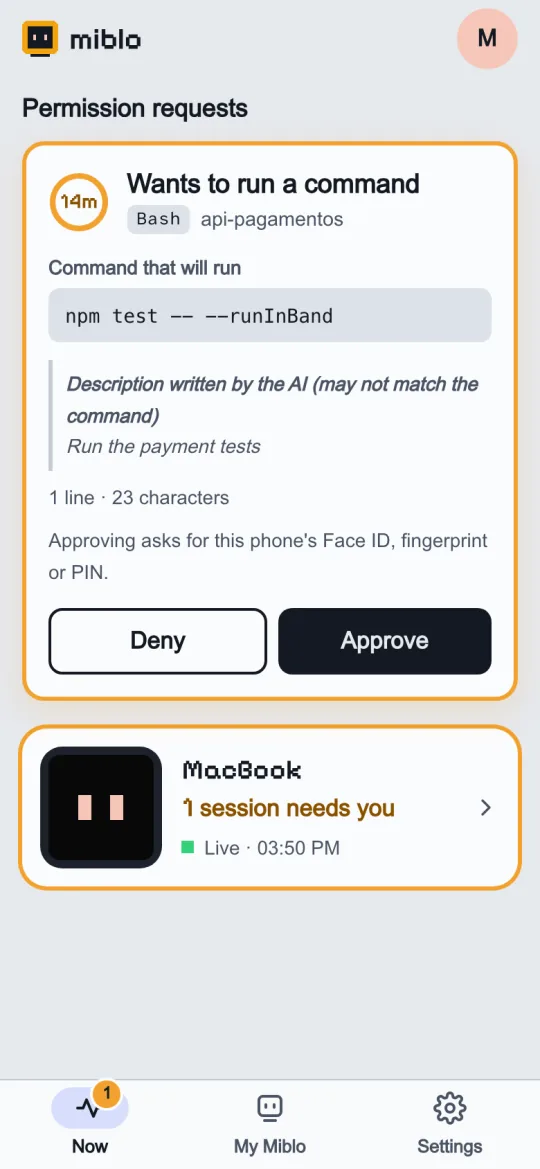
Approve or deny the exact command, with Face ID, fingerprint or PIN. You decide.
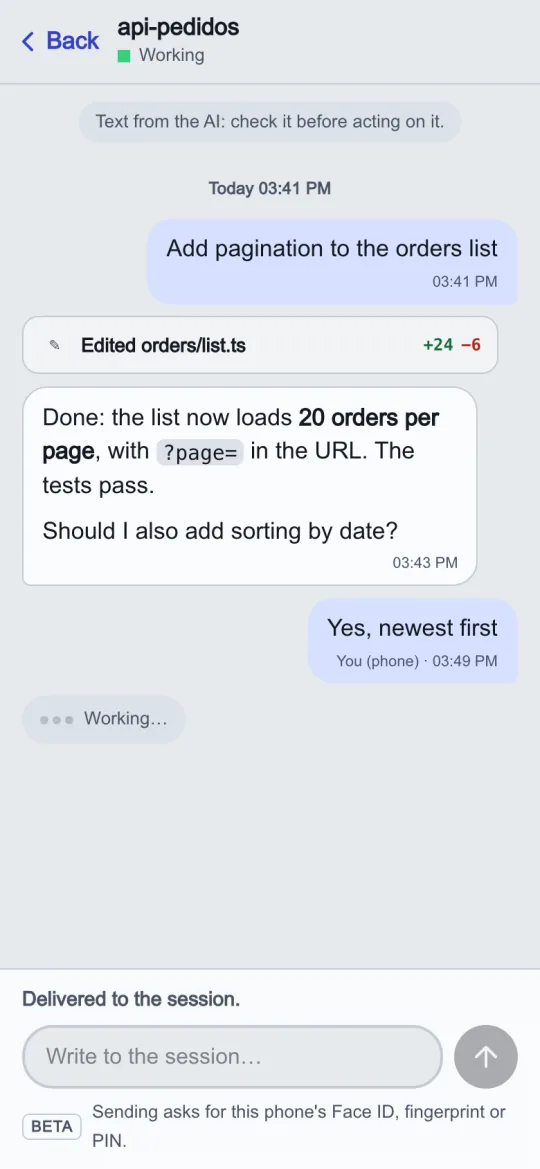
Read the conversation and reply. Your reply reaches the session.
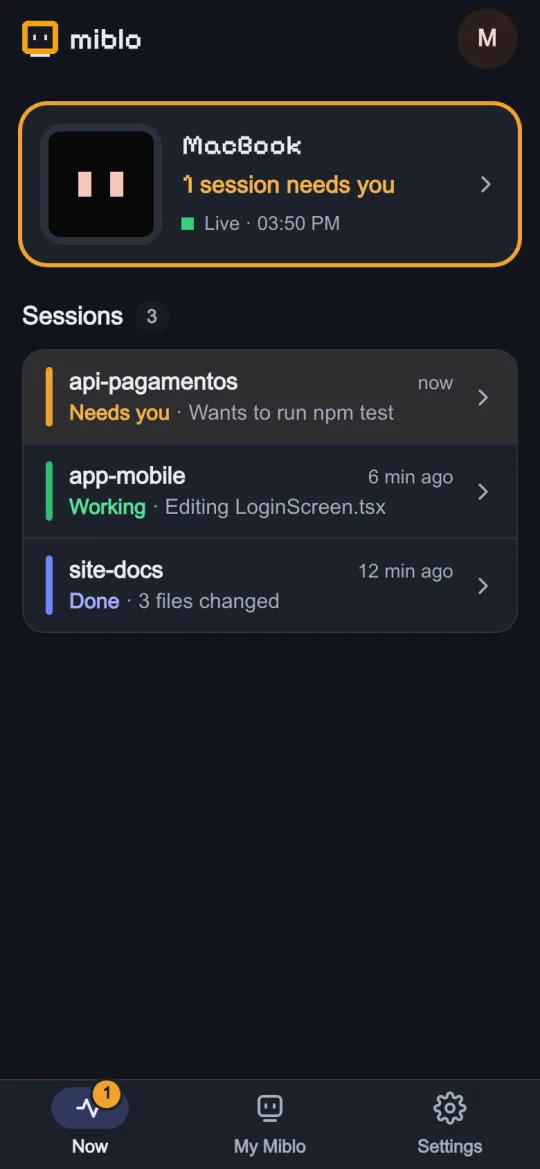
How it works
Install it on your computer
Download Miblo Hub (Mac, Windows or Linux) and sign in to it with your Miblo account.
Sign in on your phone
Open Miblo Remote (miblo.ai/app) on your phone and sign in to the same account. You can add it to your home screen.
Type the code your computer shows
Miblo Hub on your computer shows a 6-digit code for the new phone. Type it on the phone and you're done. Approvals and replies start off: turn them on at the computer when you want them.
With each AI tool
Live status is free with all of them. Approvals and replies come with Miblo+.
Claude Code · Codex · OpenCode
- Live status
- Yes
- Approvals
- Yes
- Replies
- Yes, working or idle: an idle session wakes up and answers
Kimi Code · Qwen Code
- Live status
- Yes
- Approvals
- Yes
- Replies
- Yes, when the session finishes its turn
Gemini CLI · GitHub Copilot CLI · Cursor · Antigravity
- Live status
- Yes
- Approvals
- No: the tool's own flow applies
- Replies
- Yes, when the session finishes its turn
- A reply sent while the session works goes in when it finishes its turn.
- Approvals exist only where the tool itself asks: Miblo relays its request and never asks for anything it wouldn't.
- Idle Copilot CLI, Gemini CLI, Cursor, Qwen Code and Antigravity sessions running inside tmux or GNU screen get replies right away too: Miblo types the reply into the session's terminal after checking it's the right one.
- For safety, replies only go into sessions that still ask before acting. For sessions in an automatic mode, and for OpenCode, Copilot CLI, Gemini CLI, Cursor and Antigravity (which don't report their mode), turn replies on for those cases at the computer (miblo plus replies permissive on).
From R$9.90/month
or R$99.00/year on the yearly plan
- Works without Miblo Desk
- End-to-end encrypted: the Miblo server only passes it along.
Remote control from your phone: approve, reply and check your limits
Desk apps for your Miblo
Bitcoin, weather, your calendar, your Mac's processor: Miblo shows what matters when you are not coding. Turn one on with a tap in Miblo Hub.
Works with Claude Code, Codex and your other AI agents
Miblo Hub finds the AI coding agents on your computer and connects each one in a single step.
Claude Code
- Working
- Needs you
- Finished
- Usage limits
Codex
- Working
- Needs you
- Finished
- Usage limits
GitHub Copilot CLI
- Working
- Needs you
- Finished
- Usage limits
- –
Gemini CLI
- Working
- Needs you
- Finished
- Usage limits
- –
OpenCode
- Working
- Needs you
- Finished
- Usage limits
- –
Cursor
- Working
- Needs you
- –
- Finished
- Usage limits
- –
Antigravity
- Working
- Needs you
- –
- Finished
- Usage limits
- –
Qwen Code
- Working
- Needs you
- Finished
- Usage limits
- –
Kimi Code
- Working
- Needs you
- Finished
- Usage limits
- –
Claude Code, wherever you run it
- Terminal
- Claude desktop (Code tab)
- VS Code
- Cursor
- JetBrains
On your computer
- macOS
- Windows (WSL included)
- Linux
Not supported: cloud sessions (claude.ai/code and the cloud sessions started from the Claude desktop or mobile apps) and GitHub Copilot's Claude agent, because they don't run on your computer. Tool names are trademarks of their owners; Miblo is not affiliated with them.
What you need
Check before you buy. If you use an AI coding tool on your computer, you have almost everything. Miblo Desk is optional: Miblo Hub and Miblo+ work without it.
An AI coding tool
Claude Code, Codex, GitHub Copilot CLI, Gemini CLI, OpenCode, Cursor or Antigravity, running on your computer.
Mac, Windows or Linux
Miblo Hub runs on all three. In WSL, Miblo goes in with the Linux install line, run inside it.
For Miblo Desk: 2.4 GHz Wi-Fi
The same network as your computer, with WPA2. Most home routers have it.
For Miblo Desk: a USB power plug
Any 5 V / 1 A phone charger.
For Miblo+ on your phone
A Miblo account and a phone with Safari or Chrome (iPhone or Android). Nothing to install on the phone, and Miblo Desk is optional.
Cloud sessions (claude.ai/code) don't run on your computer, so they can't reach Miblo. Tool names are trademarks of their owners; Miblo is not affiliated with them.
Made to sit on your desk without fuss
Settings in your browser
Set everything up at http://miblo.local, from any phone or computer on the network.
Updates over Wi-Fi
New versions arrive without a cable. Each update asks for the code on the screen, so nobody else on the network can touch your Miblo.
Your data stays on your network
No cloud and no account. Limits come only from the official data the tools themselves report.
7 languages
English, Portuguese (BR and PT), Spanish, French, Italian and German.
Questions
Do I need a subscription?
No. Miblo works with the AI coding tool you already use: Claude Code, Codex, GitHub Copilot CLI, Gemini CLI, OpenCode, Cursor or Antigravity. The 5-hour and weekly limits show when the tool reports them (Claude Code on the Pro and Max plans, and Codex).
Does it work on Mac, Windows and Linux?
Yes. Miblo Hub exists for all three. In Claude Code it covers the terminal, the Claude desktop app's Code tab and the VS Code, Cursor and JetBrains extensions at once.
Do I need Claude Code?
No. Miblo Hub finds the AI tools you have and shows all their sessions in one list. Have Claude Code? Miblo also goes into it as a plugin. To turn each tool on or off, use AI tools in Miblo Hub.
Can I see it on my phone?
Yes, if you want to. Sign in with the same Miblo account in Miblo Hub on your computer and in Miblo Remote (miblo.ai/app) on your phone: Miblo Remote shows your sessions, alerts and limits, with a notification when a session needs you. It is off by default and end-to-end encrypted.
What Wi-Fi does it need?
A 2.4 GHz network with WPA2, the same one as your computer. WPA3-only networks are not supported.
What leaves my network?
Nothing about your sessions. Miblo on your computer talks to Miblo Desk over your local network, with no cloud and no account. The one exception is Miblo Remote, off by default: when on, it sends only what the screen shows through miblo.ai, end-to-end encrypted.
Can I have more than one?
Yes. One computer pairs with several Miblos, and one Miblo takes up to 4 computers. On the same network, the pets visit each other too.
Do you ship outside Brazil?
Not yet. At launch we ship within Brazil only. International shipping is planned: join the waitlist on the buy page and we'll let you know.
Does Miblo approve anything for me?
Only what you tell it to. Miblo never clicks or types on your computer on its own: it shows what your AI is doing and passes on the permission requests the tool itself makes. Each request waits for your answer, on the computer or from your phone with Miblo+. If you turn on a mode that approves by itself for a task, it covers only what you chose, and every approval goes into the computer's audit log.
Is Miblo affiliated with any AI tool provider?
No. Miblo is an independent product, unaffiliated with the companies behind the supported AI tools. All trademarks mentioned belong to their respective owners.
Pick your Miblo’s colour
White, black or yellow. The same Miblo inside.
R$249.90R$189.90 or 1x R$189.90 interest-free
or R$170.91 with the coupon BEMVINDO10