A Claude Code monitor for your desk
Miblo Desk is a small screen next to your keyboard that shows what Claude Code, Codex and your other AI coding agents are doing, and tells you the moment one needs you. You stop checking the terminal every two minutes.
What it is
A 45 × 35 × 40 mm cube with a 240 × 240 screen, on your Wi-Fi. It ships with the Miblo firmware installed.
On your computer, Miblo Hub (free, macOS, Windows and Linux) finds your AI coding agents and sends their status to the Miblo Desk over your local network: no cloud and no account for the screen.
Miblo Desk is optional: Miblo Hub and Miblo Remote on your phone work without it. With it, the status lives on your desk instead of in another window.
How it works
Connect it to Wi-Fi
Plug it in, scan the QR code on its screen with your phone and pick your 2.4 GHz network.
Install Miblo Hub
It finds Claude Code, Codex, Copilot CLI, Gemini CLI, OpenCode and Cursor and sets them up, no terminal needed. In Claude Code, Miblo is also a plugin.
Pair and get back to work
Type the 4-digit code the screen shows. From then on, every session shows up on its own.
6
AI coding agents
3
systems: macOS, Windows, Linux
20
pets, plus yours
0
cloud for the screen
Three ways to use it, one rule: you decide
~$ claude ▸ needs youAt your desk
Miblo Desk shows your sessions and limits and flags the one that needs you, in a colour you catch out of the corner of your eye.
~$ codex ▸ approve?Away from your desk
Miblo Remote shows the same on your phone. With Miblo+, you approve and reply from wherever you are.
~$ miblo ▸ focus 25:00Focus
A 25 and 5 minute Pomodoro, meeting mode that hides project names, and the pet when you stop. Alerts still come first.
Nothing is approved without you
Miblo never approves anything on its own: each permission request waits for your answer, on your computer or your phone. Automatic approval exists only if you turn it on for a task, and every approval goes into the audit log on your computer.
Your AI works the same without Miblo. Miblo watches and tells you; if it stops, your AI goes on as if it weren't there.
Miblo, system notifications or watching the terminal
| Miblo | System notifications | Watching the terminal | |
|---|---|---|---|
| Seen out of the corner of your eye, without switching windows | Yes, on your desk | For a few seconds | Only with the window open |
| Approve from your phone | Yes, with Miblo+ (Claude Code, Codex, OpenCode) | No | No |
| Every AI agent in one list | 6 AI agents | Each tool its own way | One window per session |
| Usage limits in sight | Claude Code and Codex | No | Only when you check |
| Subscription required | No (Miblo+ is optional) | No | No |
What shows on the screen
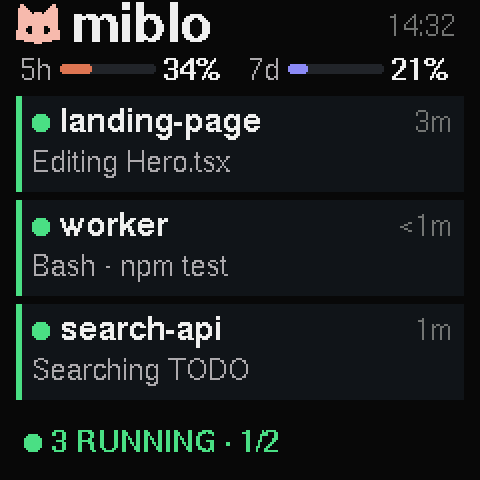
Drawn by the Miblo firmware itself, with our own techniques for a small screen: big enough to read from your chair.
Your sessions
Each running session with its project, the ones that need you first.
Needs you
An amber alert when the AI asks for a permission or a reply. A wait is never hidden.
Finished
A blue alert when a response is really finished, not at every pause.
Usage limits
Your 5-hour and weekly limits and when they reset (Claude Code on Pro and Max, and Codex).

An alert when your AI needs you
Long tasks are where AI coding agents stop to ask: a permission, a question, a choice. Miblo Desk turns that into a colour you see out of the corner of your eye, so the session doesn't sit waiting while you are in another window, in a meeting or getting coffee. Long tasks that finish get a small fanfare.
Approve from your phone with Miblo Remote
Away from your desk? With a Miblo account, Miblo Remote shows your sessions, limits and the “needs you” alert on your phone. With Miblo+, you also approve the permissions Claude Code, Codex and OpenCode ask for and reply to any of your AI agents, end-to-end encrypted.
Works with Claude Code, Codex and your other AI agents
Miblo Hub finds the AI coding agents on your computer and connects each one in a single step.
Claude Code
- Working
- Needs you
- Finished
- Usage limits
Codex
- Working
- Needs you
- Finished
- Usage limits
GitHub Copilot CLI
- Working
- Needs you
- Finished
- Usage limits
- –
Gemini CLI
- Working
- Needs you
- Finished
- Usage limits
- –
OpenCode
- Working
- Needs you
- Finished
- Usage limits
- –
Cursor
- Working
- Needs you
- –
- Finished
- Usage limits
- –
Claude Code, wherever you run it
- Terminal
- Claude desktop (Code tab)
- VS Code
- Cursor
- JetBrains
On your computer
- macOS
- Windows (WSL included)
- Linux
Not supported: cloud sessions (claude.ai/code and the cloud sessions started from the Claude desktop or mobile apps) and GitHub Copilot's Claude agent, because they don't run on your computer. Tool names are trademarks of their owners; Miblo is not affiliated with them.
Questions
What is a Claude Code monitor?
A screen that shows what Claude Code is doing without you looking at the terminal: which sessions are working, which one needs you, which one finished and how much of your limits is left. Miblo Desk is that screen, on your desk, and it does the same for Codex, Copilot CLI, Gemini CLI, OpenCode and Cursor.
Does it work with Codex, Gemini CLI, Copilot CLI, OpenCode and Cursor?
Yes. Miblo Hub connects each one with a single step. All of them show working and finished; “needs you” shows for every one except Cursor's own agent, whose hooks have no safe way to report a wait. Usage limits show for Claude Code and Codex, the tools that report them.
Does it work in VS Code, Cursor and JetBrains?
For Claude Code, yes: the Miblo plugin covers the terminal, the Claude desktop Code tab and the Claude Code extensions for VS Code, Cursor and JetBrains at once. Cursor's own agent connects separately.
Does it work on Mac, Windows and Linux?
Yes. Miblo Hub runs on all three. On Windows, WSL works too, with the Linux install line run inside it.
Can I approve Claude Code permissions from my phone?
Yes, with Miblo+. The permission prompts Claude Code, Codex and OpenCode ask for reach Miblo Remote on your phone and wait for your answer; nothing is approved for you. Seeing your sessions and the “needs you” alert on your phone is free with a Miblo account.
Do I need Miblo Desk to use Miblo?
No. Miblo Hub and Miblo Remote work without it. Miblo Desk puts the same status on your desk, where you see it without switching windows.
Do my sessions go to the cloud?
No. Miblo on your computer talks to Miblo Desk over your local network, with no cloud and no account. Only Miblo Remote, which starts off, sends what the screen shows through miblo.ai, end-to-end encrypted.
Does it show cloud sessions (claude.ai/code)?
No. Cloud sessions run away from your computer, so they can't reach Miblo. Everything that runs on your computer does.
Is there a pet?
Yes. Miblo Desk is also an AI desk companion: when you stop, one of its 20 pets (or the one you draw in Miblo Studio) plays on the screen, and Miblos on the same network visit each other. Alerts always come first.
Where do you ship?
Within Brazil for now, paid by Pix, card or boleto. International shipping is planned: join the waiting list on the buy page.
Put your AI's status on your desk
White, black or yellow. The same Miblo Desk inside.