Claude Code and Codex usage limits, always in sight on your desk
Claude Code and Codex count your usage in a 5-hour window and a weekly one (they are the only AI coding tools that report their limits; with Gemini CLI, Copilot CLI and Cursor, Miblo shows the sessions). Miblo Desk keeps both on the screen next to your keyboard, with the time each one resets and when you will run out at your current pace.
The 5-hour and weekly windows
On the plans that have them, Claude Code measures how much you use in two windows: one that covers a rolling 5 hours and one that covers the week. When a window fills up, you wait for it to reset before using that AI again.
Codex works the same way on a ChatGPT plan: a 5-hour window and a weekly one, each with its own reset time.
How much each plan gets changes over time and is the company's to say, so it is not written here. The current numbers are on Anthropic's and OpenAI's own pages.
Current plan limits, from the source
How to see your usage today
In Claude Code itself, the /usage command shows how much of your plan limits you have used. It is a command you have to remember to run, and it only tells you the moment you ask.
Codex reports the same two windows in its own interface. Miblo reads them for you, from the session files Codex writes on your computer.
Why it matters
A limit that fills up in the middle of a long task stops the work, sometimes for hours. Knowing at a glance how much is left and when it resets lets you start the big task now or wait for the next window, instead of finding out when the AI stops.
How Miblo Desk shows your limits
Drawn by the Miblo firmware on a 240 × 240 screen, always one glance away.
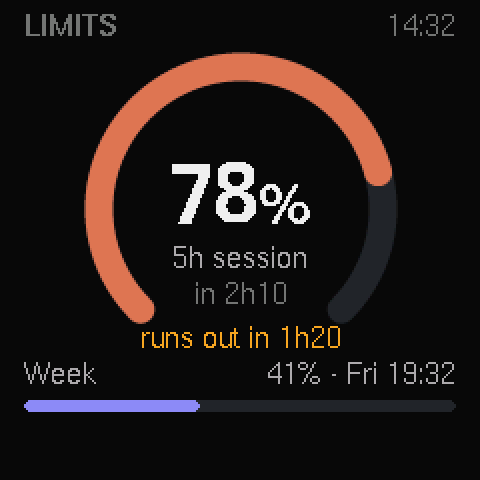
Both windows, with reset times
A large arc for the 5-hour window, a bar for the week and the time until each resets. Claude Code on Pro and Max, and Codex on a ChatGPT plan.
When you will run out
When your recent pace would use up the 5-hour window before it resets, the screen says when, in amber: “at this pace, runs out at 15:40”.
A mascot that reacts
When nothing is running, the desk mascot sits next to two gauges with your limits. It naps when there is plenty left, sweats past 80% and panics at 95%.
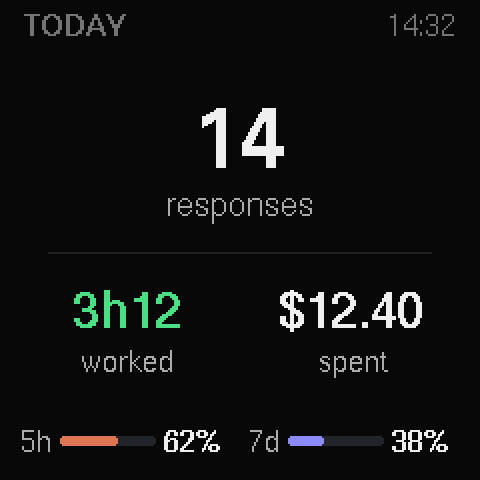
Today's summary
Responses finished, time with your AI working, today's cost and the limits with their resets.
A warning before you hit the wall
There is no beep. On the Overview, when the forecast says you will run out in less than 30 minutes, the 5-hour number turns amber and “runs out ~15:40” takes the place of the reset time. When the window resets after real use, the screen turns green with “limit freed”. Alerts that need you still come first.
And Codex
Codex's limits show the same way. The desk screen shows the limits of the AI you used most recently, and the /miblo:limits command shows both. Other tools (Copilot CLI, Gemini CLI, OpenCode, Cursor) do not report limits, so Miblo does not invent any for them.
Away from your desk, Miblo Remote on your phone shows the same limits. Claude limits on your phone
Questions
What is Claude Code's 5-hour limit?
A usage window that covers a rolling 5 hours. When it fills up, you wait for it to reset. Miblo Desk shows how much of it you have used and the time it resets.
What is Claude Code's weekly limit?
A second window that covers the week, on top of the 5-hour one. Miblo Desk shows it as a bar with the time until it resets.
How do I see my Claude Code usage?
In Claude Code, with the /usage command. To have it always in sight without running anything, Miblo Desk shows your 5-hour and weekly usage on your desk, updated after every response.
When does the Claude Code limit reset?
Each window has its own reset time. Miblo Desk shows the time until the 5-hour window resets and the one for the week, and a green “limit freed” screen when the 5-hour window resets after real use.
Can Miblo tell when I will run out?
Yes, as a forecast. When your recent pace would use up the 5-hour window before it resets, the Limits screen says when, for example “at this pace, runs out at 15:40”. It is an estimate from your pace, not a promise.
Does it work for Codex usage limits?
Yes. Codex's 5-hour and weekly limits show the same way, when you are signed in with a ChatGPT plan. With an API key there are no such limits to show.
Do I need a Pro or Max plan?
For Claude Code's limits, yes: the 5-hour and weekly limits exist on Pro and Max subscriptions. With an API key, Miblo Desk shows today's cost instead.
Does Miblo spend my usage to read the limits?
No. Miblo never sends a prompt or calls a model. Claude Code's limits come from the status line data Claude Code itself provides, and Codex's from the session files it writes on your computer.
Your limits, always in sight
White, black or yellow. The same Miblo Desk inside.