
Install
On the computer with your Miblo, run:
Installs the app's code, checked and signed by miblo.ai, and its screen. It runs sandboxed on your computer.
miblo apps install project-genesisThe app and the command check miblo.ai's signature before changing anything on your Miblo.
Does not use the internet
Addresses the author declared, checked by the automatic code scan; Miblo blocks any other.
Sees your AI sessions: project, tool and state (with your permission).
What this app asks you to set up
You set it up in the Miblo app (Apps tab) or with miblo apps config project-genesis. The values stay on your computer.
Lighting
Choice: auto, day, night · Default: auto
Motion
Choice: eco, normal, rich · Default: normal
Show important moments
On/off · Default: on
Demo mode
On/off · Default: off
About
Your AI agents build a city, and it is all yours.
Every AI session on your computer (Claude Code, Codex, Cursor and others Miblo sees) becomes a resident. Every project becomes a district. The time the AI spends working raises the buildings: from a foundation to red-roofed houses, glass buildings and neon towers, each with its own history.
When an agent waits for you for more than 15 minutes, smoke rises over its project's building. As soon as you answer, the firefighters arrive, the fire goes out and a scar remains. When a session ends after a good stretch of work, the resident walks home in celebration. Beating the day's record of AI hours lights up the whole city.
Important moments can take over Miblo's screen for a few seconds (at most one per hour, never while an agent waits for you, and Miblo's alerts always come first). The city lives on while you are away: at night the residents sleep and the windows go dark; nothing shrinks for being quiet. Demo mode tells a story of agents so you can see everything without waiting.
Privacy: from each session the app reads only the project folder name, the tool, the state (working, waiting for you, idle, done) and an anonymous session identifier. Never prompts, commands or files. It uses no internet and Miblo asks for your permission the first time. Needs Miblo 1.34.0 or newer.
Instructions
- Install the app and keep it in Miblo's apps (it shows up on its own when Miblo is idle).
- The first time, the Miblo app on your computer asks you to let Genesis see your AI sessions: click "Allow". You can change it later with "See AI sessions" in the app's settings.
- Use your AI tools as usual (Claude Code, Codex, Cursor and others). Every session becomes a resident and the city grows with every 15 minutes of AI work.
- Want to see it all without waiting? Turn on "Demo mode" in the app's settings.
Needs Miblo 1.34.0 or newer. Uses no internet.
Screenshots
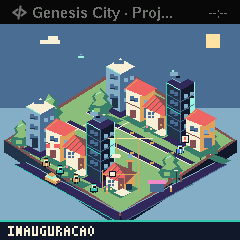
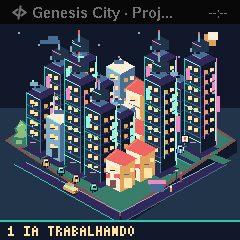
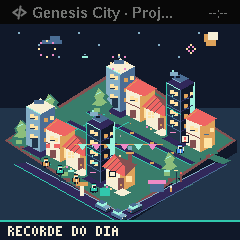
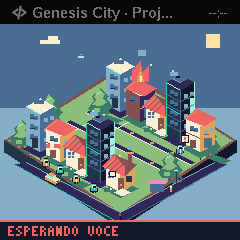
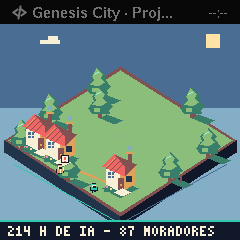
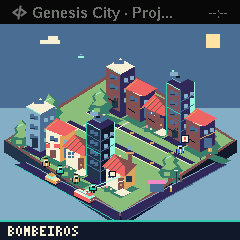
What's new
Version 3.0 ·
EN: 3.0: The new Genesis: your AI agents build a city. Sessions become residents, projects become districts, the AI's working time raises buildings. An agent waiting for you starts a fire; answer it and the firefighters arrive. Openings, finished work and the day's record take the screen. Residents in their tool's colour, a waiting sign, windows that go dark at night and a footer with AI hours. No internet; needs Miblo 1.34.0.
Your rating
Sign in to rate