
Project Genesis
Publicada porstehcnf18Versión 3.0.12 instalacionesAún sin valoraciones
Última actualización:
Instalar
En el computador con tu Miblo, ejecuta:
Instala el código de la app, revisado y firmado por miblo.ai, y su pantalla. Corre aislado en tu computador.
miblo apps install project-genesisLa app y el comando verifican la firma de miblo.ai antes de cambiar cualquier cosa en tu Miblo.
No usa internet
Direcciones que el autor declaró, verificadas por el análisis automático del código; Miblo bloquea cualquier otra.
Ve tus sesiones de IA: proyecto, herramienta y estado (con tu permiso).
Lo que esta app del Desk te pide configurar
Lo configuras en Miblo Hub (pestaña Apps del Desk) o con miblo apps config project-genesis. Los valores se quedan en tu computador.
Lighting
Opción: auto, day, night · Por defecto: auto
Motion
Opción: eco, normal, rich · Por defecto: normal
Show important moments
Activado/desactivado · Por defecto: activado
Demo mode
Activado/desactivado · Por defecto: desactivado
Acerca de
Your AI agents build a city, and it is all yours.
Every AI session on your computer (Claude Code, Codex, Cursor and others Miblo sees) becomes a resident. Every project becomes a district. The time the AI spends working raises the buildings: from a foundation to red-roofed houses, glass buildings and neon towers, each with its own history.
When an agent waits for you for more than 15 minutes, smoke rises over its project's building. As soon as you answer, the firefighters arrive, the fire goes out and a scar remains. When a session ends after a good stretch of work, the resident walks home in celebration. Beating the day's record of AI hours lights up the whole city.
Important moments can take over Miblo's screen for a few seconds (at most one per hour, never while an agent waits for you, and Miblo's alerts always come first). The city lives on while you are away: at night the residents sleep and the windows go dark; nothing shrinks for being quiet. Demo mode tells a story of agents so you can see everything without waiting.
Privacy: from each session the app reads only the project folder name, the tool, the state (working, waiting for you, idle, done) and an anonymous session identifier. Never prompts, commands or files. It uses no internet and Miblo asks for your permission the first time. Needs Miblo 1.34.0 or newer.
Instrucciones
- Install the app and keep it in Miblo's apps (it shows up on its own when Miblo is idle).
- The first time, the Miblo app on your computer asks you to let Genesis see your AI sessions: click "Allow". You can change it later with "See AI sessions" in the app's settings.
- Use your AI tools as usual (Claude Code, Codex, Cursor and others). Every session becomes a resident and the city grows with every 15 minutes of AI work.
- Want to see it all without waiting? Turn on "Demo mode" in the app's settings.
Needs Miblo 1.34.0 or newer. Uses no internet.
Capturas de pantalla
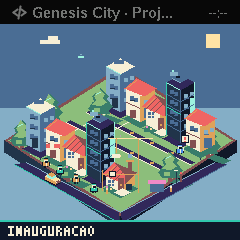
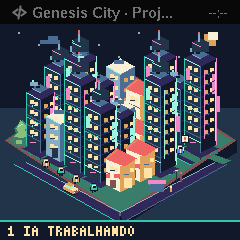
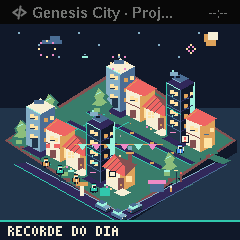
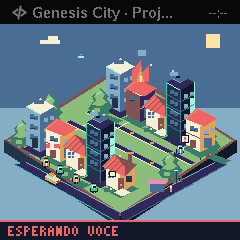
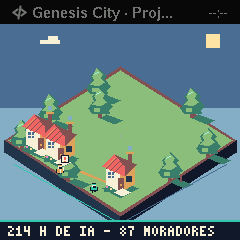
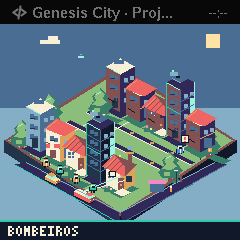
Novedades
Versión 3.0.1 ·
No hay notas para esta versión.
Versión 3.0 ·
EN: 3.0: The new Genesis: your AI agents build a city. Sessions become residents, projects become districts, the AI's working time raises buildings. An agent waiting for you starts a fire; answer it and the firefighters arrive. Openings, finished work and the day's record take the screen. Residents in their tool's colour, a waiting sign, windows that go dark at night and a footer with AI hours. No internet; needs Miblo 1.34.0.
Tu valoración
Inicia sesión para valorar